Module · Platform foundation
Records registry
The institution's general incoming/outgoing register and its special registers.
The Records registry module maintains a single electronic record of every document registered across the institution — the general incoming/outgoing register and the special registers — whatever channel the document arrived through: the counter, e-mail, the portal or the kiosk. Documents produced by the workflows of any module are registered automatically, with the number and the date assigned, without the operator doing anything.
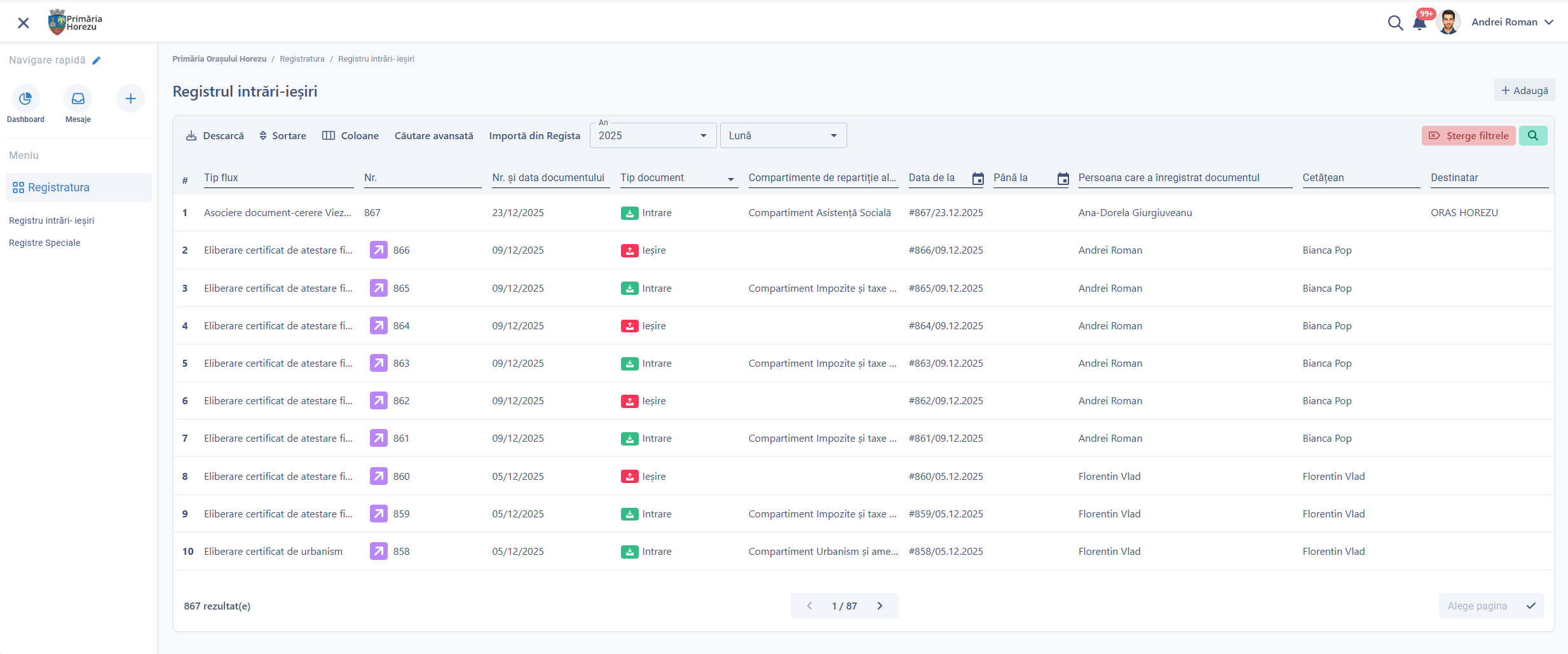
The general incoming/outgoing register: automatic numbering, allocation to departments and deadlines.
What changes in the flow of documents
No document is lost and no deadline expires unnoticed: every entry has a unique number, a responsible department and an automatically calculated deadline, and overruns are flagged in advance.
What you can do
A single record of every document in the institution, whatever channel it arrives through.
General register
Incoming and outgoing, with automatic numbering configurable by year and prefix.
Unlimited special registers
Decisions, council resolutions, minutes, freedom-of-information requests and others, defined from the administration interface.
Automatic registration
Documents produced by the workflows of any module receive incoming and outgoing numbers without manual intervention.
Manual registration
With file upload, document type, number of pages, departments for allocation and a response deadline.
Allocation
To one or more departments, with a notification in the platform and by e-mail, and the date it was sent.
Import from external registers
For continuity of the record, with fields pre-filled by OCR from scanned documents.
Dispatch lists and files
A dispatch-list number for documents sent together, and a “Documents with this number” section.
Ad-hoc workflows
Started on any entry made outside a structured workflow.
See all features
- New registers configured from the administration interface: fields, numbering rules, prefix, starting number and rights by department
- Life-cycle states: registered, allocated, in progress, in an ad-hoc workflow, completed, filed or archived
- External, internal and ad-hoc workflows, with approvers defined when the workflow starts, with no software development
- Internal activities with an owner, a deadline and a status, allocated to workflow steps
- Colour coding by status: green for processing, orange for clarifications, red for rejection
- Delegation of responsibilities to a substitute, who takes over the rights for the duration of the absence
- A downloadable audit report for every application, with all the steps, the people responsible and the actions
How it works
From the document arriving on any channel to its closure or archiving.
ArrivalCounter, e-mail, portal or kiosk
NumberingAutomatic, in the corresponding register
AllocationDepartments, with a notification and a date
DeadlineCalculated automatically for documents with a statutory deadline
ResolutionA structured workflow or an ad-hoc workflow
DispatchOutgoing number, dispatch list, archiving
What you get as standard
The module is not just an interface. It comes configured in its standard version, ready to use from day one.
- forms
- workflows
- registers
- reference data
- document templates
- business rules
- validations
- notifications
- reports
- dashboards
- access rights
- audit
Native integrations
The records registry is the component every other module rests on.
Part of the same platform
The records registry is part of the base package, together with the workflows and the documents. It is not bought separately for each department: there is one, for the whole institution.
How you can start
You do not have to digitise the whole institution at once.
START ONE
The records registry is part of the base package — it is the starting point of any implementation.
START PRO + RECORDS REGISTRY
The specialist modules are added on top, registering their documents automatically in the corresponding registers.
Want to see how the Records registry would work in your administration?
We show you the general register and the special registers on real data, with allocation and deadlines tracked automatically.