Module · Platform foundation
Organisational chart
The organisational structure of the administration, configured in the platform.
The platform is tailored to the institution's organisational chart: departments, positions, reporting lines and role holders. The configured chart governs how documents are routed, access rights, the approval steps in workflows and the data shown in each employee's profile.
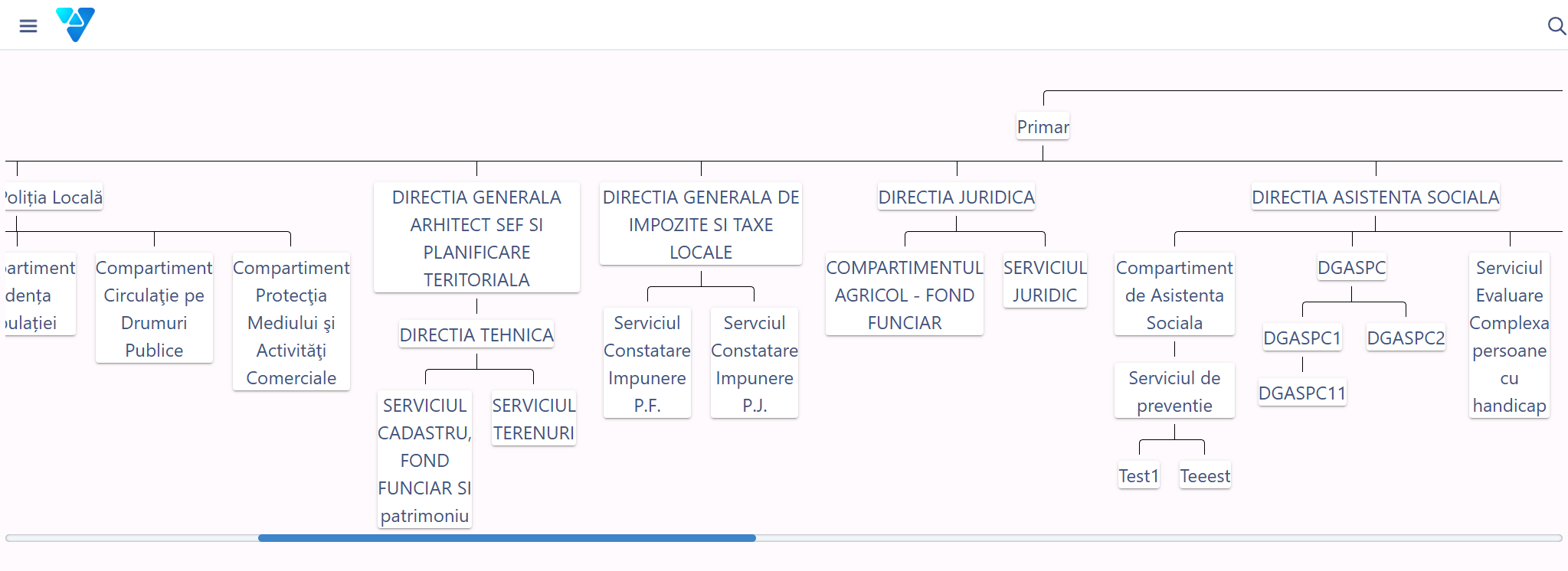
The organisational chart: departments, positions and reporting lines.
What changes when you reorganise
The platform speaks the institution's language from day one: routing, approvals and access rights follow the real organisational structure exactly, and a reorganisation means changing the chart, not the workflows.
What you can do
The organisational structure becomes the engine behind routing, rights and approvals.
Departments and positions
Defined in line with the institution's approved structure, with reporting lines.
Employee profile
Manager, position and department taken from the configured chart.
Routing of documents
Requests and documents reach the right department, according to the chart.
Rights and roles
Allocated on the organisational structure, not on individual users.
Hierarchical approval steps
Head of department, directorate, senior management — in the real order.
Updated from administration
The structure is changed from the interface, with no changes to the source code.
History of changes
A record of the organisational structure over time.
Reports by structure
Activity measured by department and position.
See all features
- A record of the organisational structure and of the history of changes
- Activity reports by department and position
- Delegation of responsibilities during absences, with the transfer of rights
- Document visibility limited to the user's branch of the organisational chart
How it works
From the institution's approved structure to the effective rights of every member of staff.
StructureDepartments, positions, reporting lines
EmployeesAssigned to positions and departments
RolesRights allocated on the structure
RoutingDocuments reach the right department
ApprovalThe steps follow the configured hierarchy
UpdateReorganisation is done from the administration interface
What you get as standard
The module is not just an interface. It arrives configured in its standard version, ready to use from day one.
- forms
- workflows
- registers
- reference data
- document templates
- business rules
- validations
- notifications
- reports
- dashboards
- access rights
- audit
Native integrations
The organisational chart governs security, routing and personnel data.
Part of the same platform
The organisational chart is not a drawing: it is the configuration that governs who sees what, who approves what and where every document goes in the platform.
How to get started
You don't have to digitise the whole institution at once.
START ONE
The organisational chart is part of the initial configuration — it is set up before any specialist module.
START PRO + ORGANISATIONAL CHART
When the structure changes, you update the chart; workflows and rights fall into line automatically.
Want to see how the Organisational chart would work in your administration
We'll show you how the configured chart determines routing, approvals and access rights.